
SCM Client Requirements
To use Git, The Git executable must be installed on the FlexDeploy server & build endpoints, and it must be accessible in its PATH. The Git executable version must be 1.7.9 or higher.To use PVCS, the pcli executable must be installed on the FlexDeploy server & build endpoints, and it must be accessible in its PATH.To use Surround, the Surround SCM executable must be installed on the FlexDeploy server & build endpoints, and it must be accessible in its PATH. The Surround SCM version must be 2018.2.0 or higher.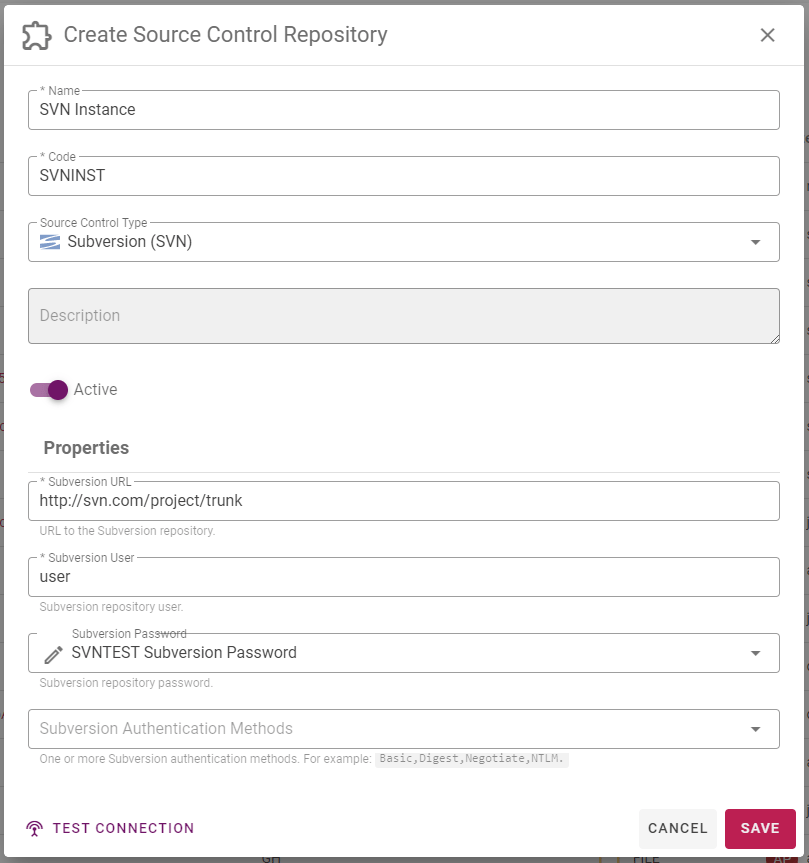
Field Name | Required | Description |
|---|---|---|
Instance Name | Yes | Long display name for the Instance. |
Instance Code | Yes | Short name for the Instance. |
SCM Type | Yes | Once the SCM Instance is saved, this field cannot be modified. |
Description | No | A description of the Instance. |
Active | Yes | Whether or not the Instance is active in the system. Defaults to “Yes”. |
URL | Depends | URL to the repository If using SVN, For example, if the path to your project is: https://subversion.flexagon.com/svn/trunk/BRANCH-4.0-fixpack1/FlexDeploy The the SVN instance should be set to https://subversion.flexagon.com/svn/ and the trunk path script should be set to ”/trunk/BRANCH-4.0-fixpack1/FlexDeploy” (Note this is in quotes as it is a groovy script input.) If using PVCS, This will be the Project Database client name configured on the FileServer. e.g. /opt/pdb/pdbname |
User | Depends | User name to login to the repository. |
Password | Depends | Password to login to the repository. Note that encrypted properties are stored in Credential Store (Local or External) and can be configured using Edit button next to credential name once selected in the dropdown. Alternatively, you can reuse a single credential for multiple properties also, in which case you should name that credential appropriately. |