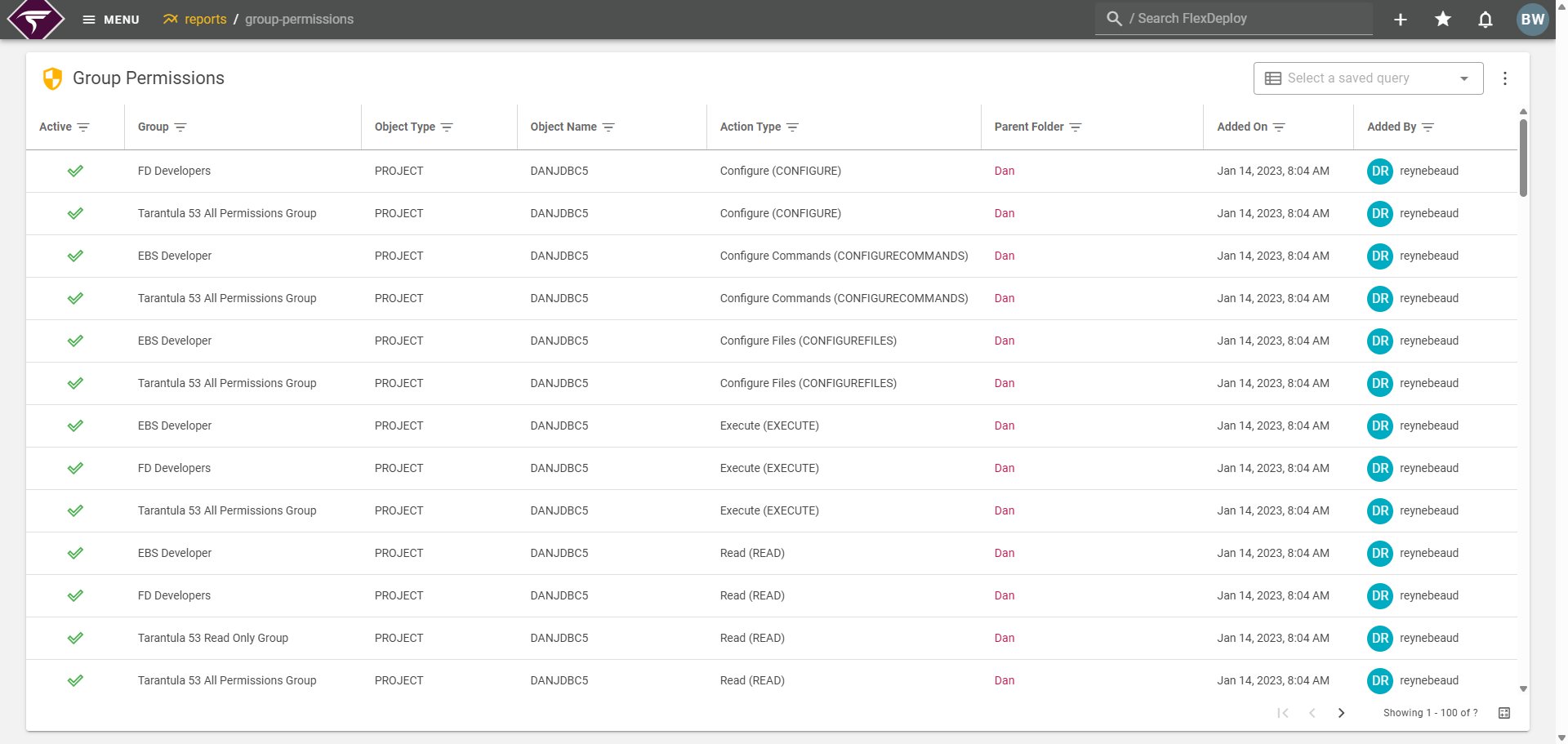
Table Details
Active- Indicates the active status of the object
- Displays as ‘All’ for FlexDeploy Administrators. In the exported artifact it will display as ’*’
- Displays as ‘EVENTLISTENER’ for Webhook Listener permission.
- Displays as ‘WINDOW’ for Schedule Window Setup permission.
- For object-level actions such as Read and Update on Project, Folder, Release, Environment, Target Group, Workflow, Pipeline, Dashboard, and Saved Query, the report lists each secured object with its Object Name. When a group is granted access for All objects of that type, each object appears as its own row.
- For Create on those object types, Object Name displays as All (global-only grant).
- Displays as All for FlexDeploy Administrators or for global permission object types.
- Folder of which the object is located in. Only applicable for Projects, Releases, and Folders.
- Action type code is surrounded in parenthesis to show which type to filter for that row. For example, if a row has the Action Type column as “Create / Update (UPDATE)”, then filter the column by the UPDATE action type to include that row in the results. The action type code will not be visible in the exported artifact.
- Shows when the group permission was granted and by which user.