Groovy is a scripting language that FlexDeploy uses in many places. It allows users to configure values of inputs and variables based on context.

Usage

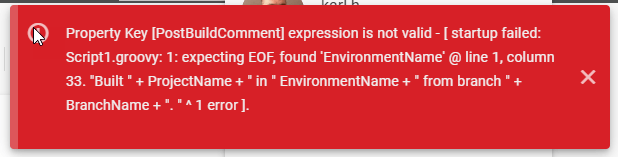
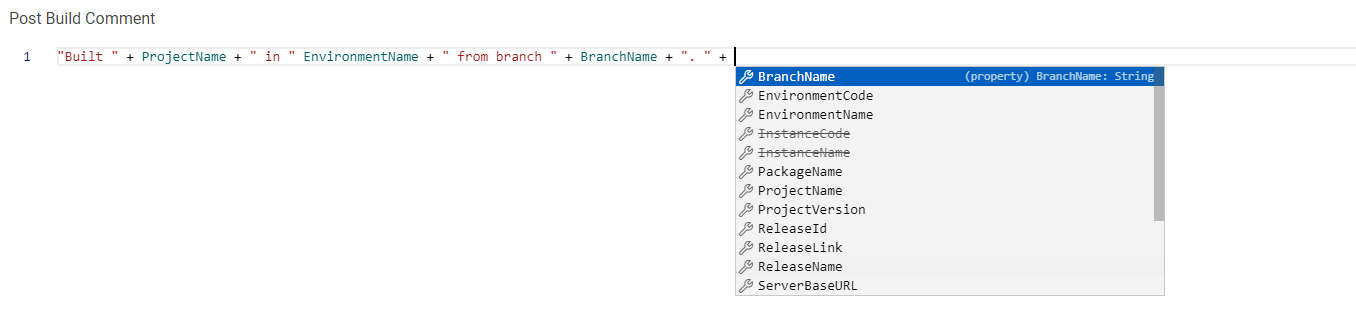
To enable Groovy code for an input, click the curly braces next to a value. Some inputs are locked to Groovy mode and can’t be toggled. once it’s enabled, you will see the purple script indicator Image on the left side. The Maximize button on the right will enlarge the input so that you can see your code more easily. Pressing Ctrl+ Space, period, will open a drop down of potential variables or functions available to you based on the context. Regular text values should be quoted. Image Clicking the Minimize button Image in the top right will collapse the input again and you can save your work. If your Groovy Script has a compilation error, you will be notified when you save. Other errors are found at run time and will be found when the value is used. In the above example, there was a compilation error. It shows this in the UI: Image Fix the problem, close the error popup, and save again. Image After adding the missing plus sign, the value saves successfully.
currentUser variable

@Since 11.2.0.0 Interactive Groovy scripts can use the currentUser variable, which was previously available only in Work Item field scripts. It represents the signed-in user and provides methods such as getUserId(), getUserName(), getFirstName(), getLastName(), getEmail(), and getRoles(). currentUser is available when a user is interacting with FlexDeploy in the UI, including Work Item field scripts, Groovy Libraries (including Try It), Run Groovy, workflow input default and validation scripts, and property, plugin input, flexfield, list data, and release property form scripts. currentUser is not available in workflow execution, pipeline execution, or webhook scripts, because those contexts do not have an interactive signed-in user.

Limitations

Imports

  • Some scripts in FlexDeploy are appended to other scripts, such as File Type customizations. As a result, they cannot contain import statements.
  • Multiline imports are not supported. For example:
  • Static imports are not supported
FlexDeploy 10.0.0.0Imports in File Type customizations and static imports are scheduled to be supported in FlexDeploy version 10.0.0.0

Known Issues

If you make a multi-line groovy expression, and start lines with +, you may get the error [No signature of method: java.lang.String.positive() is applicable for argument types: () values: [] Possible solutions: notify(), tokenize(), size(), tokenize(), size()]. In this case, move the + signs to the ends of the lines above. e.g. this might not work:
but this will: