
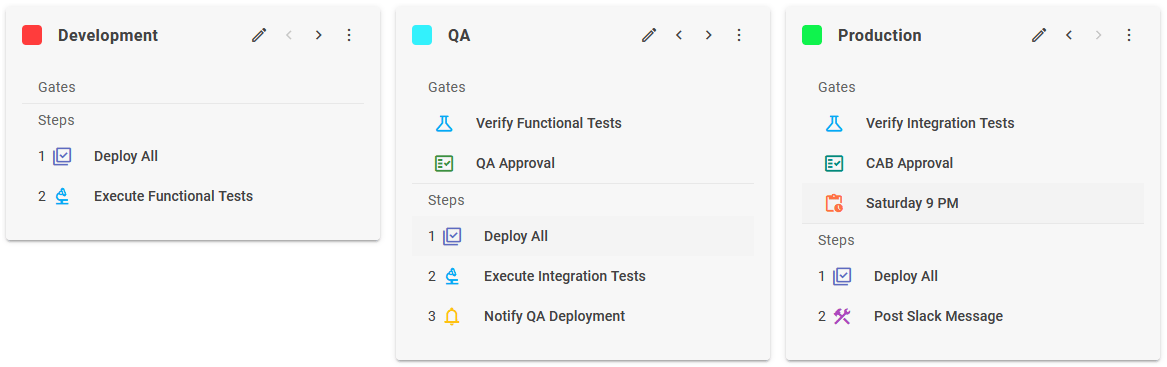
Pipeline Gates
Gate Type | Description |
|---|---|
Creates an approval task for the defined group, and blocks transition until the task is approved. If the task is rejected, the stage execution is marked as failed, and execution is terminated. | |
Creates an approval task tied to an external system (e.g. ServiceNow), and blocks transition until the task is approved. If the task is rejected, the stage execution is marked as failed, and execution is terminated. | |
Blocks transition until the defined schedule is reached, or overridden by a user with appropriate privileges. | |
Evaluates the test qualifiers for any tests which were executed for the same snapshot in the configured environment. The gate is successful if the qualifiers determine success, or fails otherwise. | |
Evaluates any scans that were executed within the current pipeline execution on build or in a previous environment in the pipeline. The gate is successful if the qualifiers determine success, or fails otherwise. | |
Executes custom groovy based implementation of gate. | |
Ensures that Work Items associated to the Release have met certain criteria before the Pipeline Execution can continue. |
Pipeline Steps
Step Type | Description |
|---|---|
Deploys a single project version from the snapshot to the current stage. | |
Deploys all project versions from the snapshot to the current stage, using the deploy priorities configured on the release. | |
Executes the configured pre-deploy workflow for a single project version from the snapshot to the current stage. | |
Executes all the configured pre-deploy workflows for project versions from the snapshot to the current stage, using the deploy priorities configured on the release. | |
Executes tests in the current stage for a single project, according to the defined strategy (on the project). | |
Executes tests in the current stage for all projects in the snapshot, according to the defined strategy (on the projects). | |
Executes custom groovy based implementation of step. | |
Executes a single utility workflow in the current stage. | |
Executes all utility projects in the release for the current stage according to the deploy priorities. | |
Promotes current snapshot project versions to a specific release. | |
Sends an email to provided email address, FlexDeploy User, or FlexDeploy Group. | |
A container for other steps to be executed serially. Useful to execute the entire group in parallel to another step or group. | |
Halts execution for a configured number of seconds, or until a particular date and time. | |
Halts execution waiting for the task to be marked complete by a user in the defined group. | |
Halts execution until the date/time evaluated by the given cron expression is reached. | |
Deploys all projects versions in the snapshot and executes all utility workflows defined in the release, using the configured deploy priorities. | |
Applies a number of optional updates to Work Items in the Release, such as updating the status or adding attachments. | |
Applies updates to Change Tickets associated to the Stage Execution Info, such as adding comments and attachments. |