
-
The
TaskCodeis set toFND_MANAGE_VALUE_SETS -
The
AttributeNameis set toValueSetCode -
The
AttributeValueis set to the ValueSetCode of the ValueSet that you wish to download.
-
The
TaskCodeis set to one ofFND_MANAGE_COMMON_LOOKUPS,FND_MANAGE_STANDARD_LOOKUPS, orFND_MANAGE_SET_ENABLED_LOOKUPS -
The
AttributeNameis set toLookupType -
The
AttributeValueis set to the LookupType of the Lookup that you wish to download.
Target Properties
Property Name | Property Code | Required | Description |
|---|---|---|---|
Oracle SaaS FSM Account |
| No* | Oracle SaaS cloud account will be required on either the plugin input or Target. If a value is set on both then, the plugin input will take precedence. You can manage the Oracle SaaS cloud account via the Integrations > Cloud page. See Configuring Oracle SaaS Cloud Account for additional details. |
Inputs
Input Name | Input Code | Required | Description |
|---|---|---|---|
Oracle SaaS FSM Account |
| No* | Oracle SaaS FSM Account will be required on either the plugin input or Target. If a value is set on both then, the plugin input will take precedence. See Special Considerations below for instructions on how to create Oracle SaaS FSM account. |
API Timeout |
| No | Maximum amount of time (seconds) to wait for export process to complete after it is started. Defaults to 900 seconds (15 minutes). |
Download Folder |
| No | Absolute or relative target folder path. Relative path will be assumed in FD_TEMP_DIR. |
Task Code |
| Yes | Code of the Setup Task. |
Business Object Code |
| No** | Code of the business object whose attribute is used as the scope. |
Attribute Name |
| No** | Name of the attribute of the business object used as the scope. |
Attribute Value |
| No** | Specify the value of the named attribute used to define the export criteria. To provide multiple values, separate them using double hash symbols (##). e.g.: Each value specified will result in a separate file export. |
Artifacts
This operation does not produce any artifacts.Endpoint Selection
This operation will select all available endpoints associated to the Target.Endpoint Execution
This operation will execute on any one of the selected endpoints and will be random in the determination of which one.Special Considerations
Optional Inputs**
Business Object Code, Attribute Name, and Attribute Value are usually all required when exporting any Setup Tasks with a scopeable business object. In the special case of JSON exports of Value Sets or Lookups, specify the Attribute Name as ValeSetCode or LookupType respectively, and use Attribute Value to pass in the LookupType or ValueSetCode. In the special case of Value Set tasks (i.e. Manage Chart of Accounts Value Sets, Manage Applications Core Value Sets, Manage Purchasing Value Sets, etc..). only FDFSM_INP_ATTRIBUTE_VALUE input is required. You must provide the Value Set Code for the Value Set in order to download a subset of the Value Set. See below image as an example.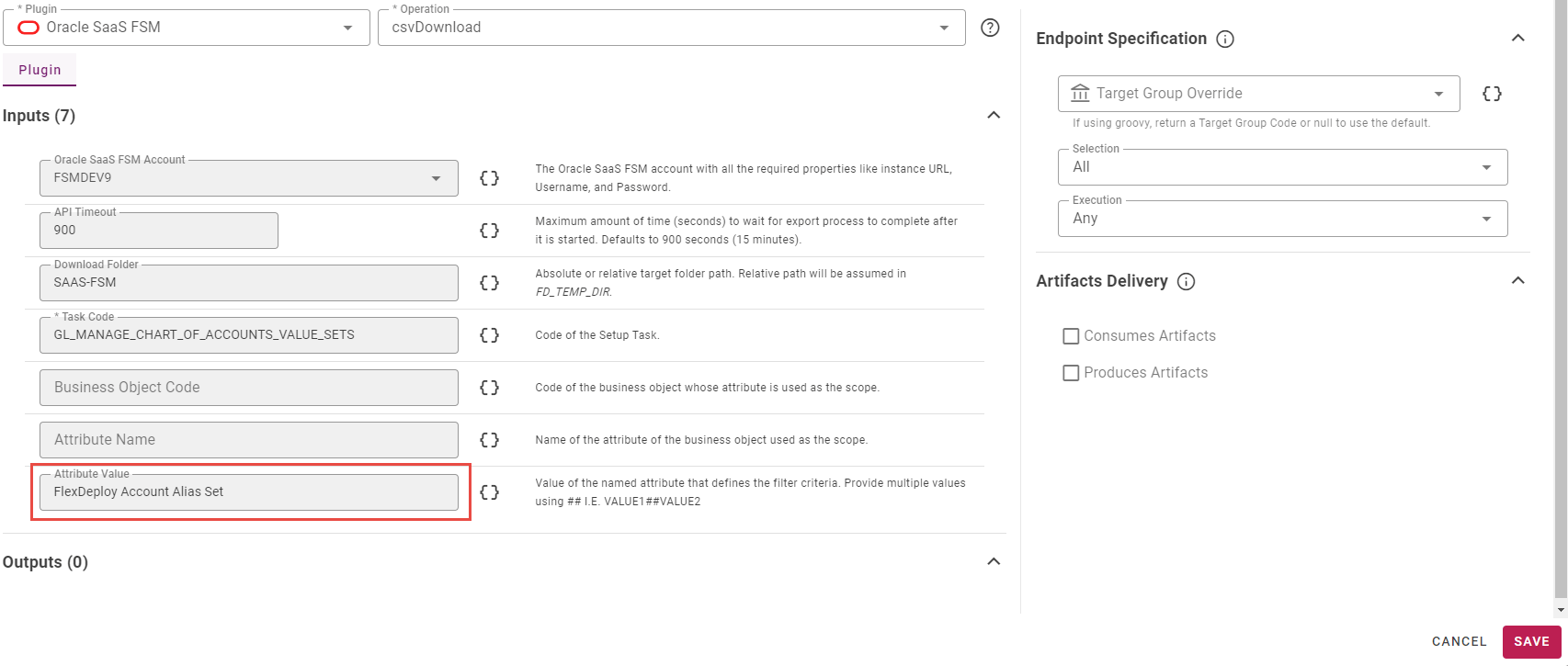
Download Folder Structure
csvDownload maintains the following folder structure convention when saving the CSV File packages to the file system:Inputs Provided | Output File |
|---|---|
Only | <FDFSM_INP_DOWNLOAD_FOLDER>/SetupTasks/<TaskCode>.zip |
If | <FDFSM_INP_DOWNLOAD_FOLDER>/SetupTasks/<TaskCode>/<AttributeValue>.zip |
If | <FDFSM_INP_DOWNLOAD_FOLDER>/SetupTasks/ValueSets/<TaskCode>/<AttributeValue>.zip |
If | <FDFSM_INP_DOWNLOAD_FOLDER>/SetupTasks/Lookups/<TaskCode>/<AttributeValue>.zip |
If | <FDFSM_INP_DOWNLOAD_FOLDER>/SetupTasks/Flexfields/<TaskCode>/<AttributeValue>.zip |
If | <FDFSM_INP_DOWNLOAD_FOLDER>/SetupTasks/FastFormulas/<TaskCode>/<AttributeValue>.zip |