Requirements
See FlexDeploy System Requirements for details on software and hardware requirements.Automated Installer Instructions
If you are using the automated installer, do not follow this guide.Manual Schema Installation Instructions
FlexDeploy has three schemas (FD, FF, and FD_ADMIN) which must be created, and populated with its seed data. Run these database scripts from where you extracted downloaded FlexDeploy zip file. Navigate to the /database/oracle/install directory, and run the following SQL scripts using SQLPlus.Use of Tablespaces
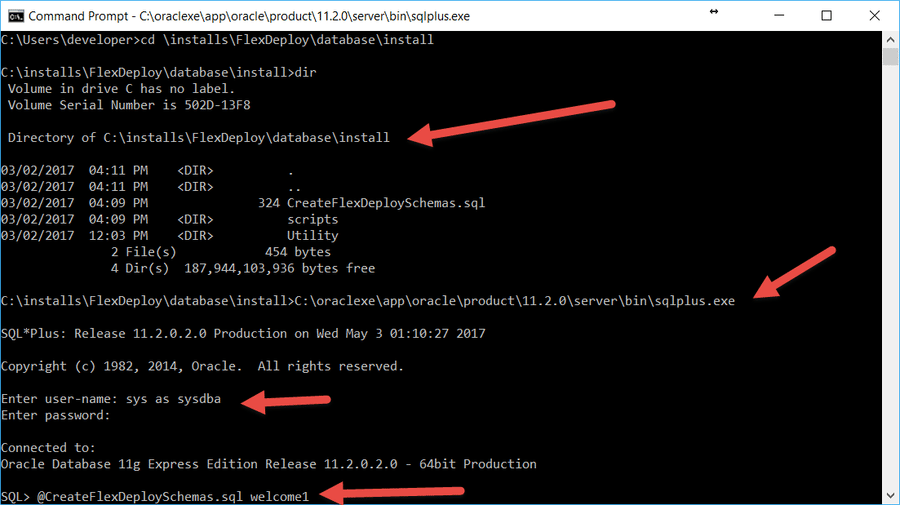
Database scripts documented below will create FF, FD and FD_ADMIN schemas with USERS tablespace as default tablespace. You can either change to use different tablespace (update CreateFF.sql, CreateFD.sql) or configure USERS tablespace with appropriate storage configurations. Normal database backup procedures should be followed.The AL32UTF8 character set is a good choice.You must be in /database/oracle/install folder from extracted zip, launch sqlplus(use full path if not available on PATH environment), login as sys or system and then execute the script.Note - requires running as a user like system or sys with privileges to create users and objects within those schema users
-
CreateFlexDeploySchemas.sql <password>
- password – the password to use for the FD_ADMIN user created by this script.
- Example: @CreateFlexDeploySchemas.sql welcome1
- Results are automatically spooled to a file called CreateFlexDeploySchemas.out
SQLPlus
sqlplus
Oracle sqlus is part of the Oracle Client, and may be executed on any host which has it installed. If the Oracle Client is not installed on the same host as where you are installing FlexDeploy, you can copy the /database directory from your distribution to any host which does.To launch sqlplus: