
InfluxDB System Requirements
- 2 to 4 GB of available RAM for the system
- 1+ CPU or vCPU Cores
- Recommend 5GB of disk space for storage of InfluxDB data with a minimum of 500 IOPS for the storage device. This is a part of the total space recommended for the Application Directory here
- At least 16384 available file descriptors (ulimit) on Linux machines
InfluxDB Directory Structure with FlexDeploy
The executables for the database and the command line client along with the associated configuration are stored in the influxdb directory in the <FLEXDEPLOY_HOME>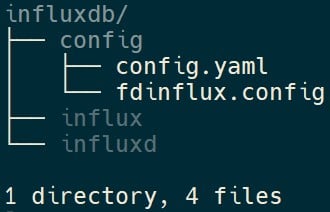
- config.yaml - Used to store customizations to the overall InfluxDB configuration. Details on available options can be found here
- fdinflux.config - Stores details that will be used by FlexDeploy to connect to the InfluxDB instance like URL, Org, and Bucket. Can also be used to override the default value for the wait duration between writes.
InfluxDB Token Management
Theinflux auth command can be used to manage the API Tokens for use with FlexDeploy. Further information about the command can be found here.
-
The
influxd auth listcommand can be used to list all the API Tokens available for the instance. -
The
influx auth createcommand can be used to create a new API Token that can be used by FlexDeploy.
FlexDeploy requires the created API Token to have the following permissions at the minimum. -
The
influx auth active -i <token_id>and theinflux auth inactive -i <token_id>commands can be used to activate and deactivate API Tokens temporarily as required. -
The
influx auth delete -i <token_id>command can be used to delete any unused API Tokens.
Retention Policy for Metrics/Insights
The retention policy for the time series data in InfluxDB is set to 2 years after the installation of FlexDeploy. This is separate from the Purge Settings available in FlexDeploy and only covers the duration of data available to be displayed in Metrics/Insights. Any data older than this is automatically removed by InfluxDB at regular intervals. The retention period can be modified by using the below command if required.Linux
Windows
Common Troubleshooting
Influx Log is growing very fast
Check your open file limits. Influx opens a large number of files to complete its work. Usually the log messages are about this.ulimit -Hn
will show the open file limit for the current user. Make sure you run it as the user who will be executing FlexDeploy and Influx.
If it is less that 65536, we recommend raising it.
sudo vi /etc/security/limits.conf
where oracle is the user logged into the box to run FlexDeploy:
oracle soft nofile 16384
oracle hard nofile 65536
Check if InfluxDB is currently running
Theinflux ping command can be used to check if InfluxDB is currently running. Influx starts from the StartFlexDeploy.sh script. Please always use the StartFlexDeploy.sh script to start FlexDeploy.
If you are running multiple influx servers on your box, or you are running on a different port, then your command will be influx ping --host $\{INFLUX_DB_URL\}
If InfluxDB is running, “OK“ is printed as the output with a 0 return code.
If InfluxDB is not currently running, the return code is 1 with an error along the following lines.
Resolving unauthorized access Issue
If influxdb is having a token authentication issue, you will see something like this: Query execution failed - [HTTP_REQUEST_FAIL: Request failed: {“code”:“unauthorized”,“message”:“unauthorized access”}]. We will need to either read current token, or generate new token and then set the token value in FlexDeploy credential. Note that there is no need to restart FlexDeploy tomcat server.Step 1.1 - Reading current tokens
You can find the value of any existing tokens with the following commands:Linux / Docker
Windows
Step 1.2 - Generate a new token (if not found)
The following command will generate a new token for InfluxDB.Linux
Windows
gCQtXdu_zIbztH-tOkccUx9o1HQZinoaKGivqIT2MAn5X8b-RjjED3RK7QRhRhxS0PqK_2AmZwHcKf08IE7SkA== is the token.