Key Features
- Simple configuration
- Supports Oracle Process Automation (with Oracle Integration 3)
- Use package deployment to deploy selected Process and Decision applications
- Build Process and Decision applications from an OPA instance or from SCM
- Export Process and Decision applications using discover/SCM-compatible paths
- Environment-specific overrides using connector, credentials, and role members plans
- Property replacement on plan values by environment
- Create connector, credentials, and role members plan templates from an OPA workspace
- Override REST connector base URLs, global credentials, and workspace role members during deploy
- Activate applications as part of deployment when configured
Plugin Operations
- packageBuild (OPA)
- packageDeploy (OPA)
- exportApplications (OPA)
- createConnectorPlan (OPA)
- createCredentialsPlan (OPA)
- createRoleMembersPlan (OPA)
FlexDeploy Project And Deploy Recommendations
Process and Decision Applications are supported through Package-based projects, so a single project can be used to manage both supported file types. Applications can be exported directly from the OPA Cloud instance or sourced from SCM. If a Process Application uses an OIC Integration, the integration must be deployed first using the OIC Plugin. Once the integration is available in the target environment, deploy the Process Application using the OPA Plugin.Notes
This plugin does not support basic auth for any operations that utilize the REST API. This is restricted by Oracle.
Additional Information
Supported File Types
Browser Extension- OPA
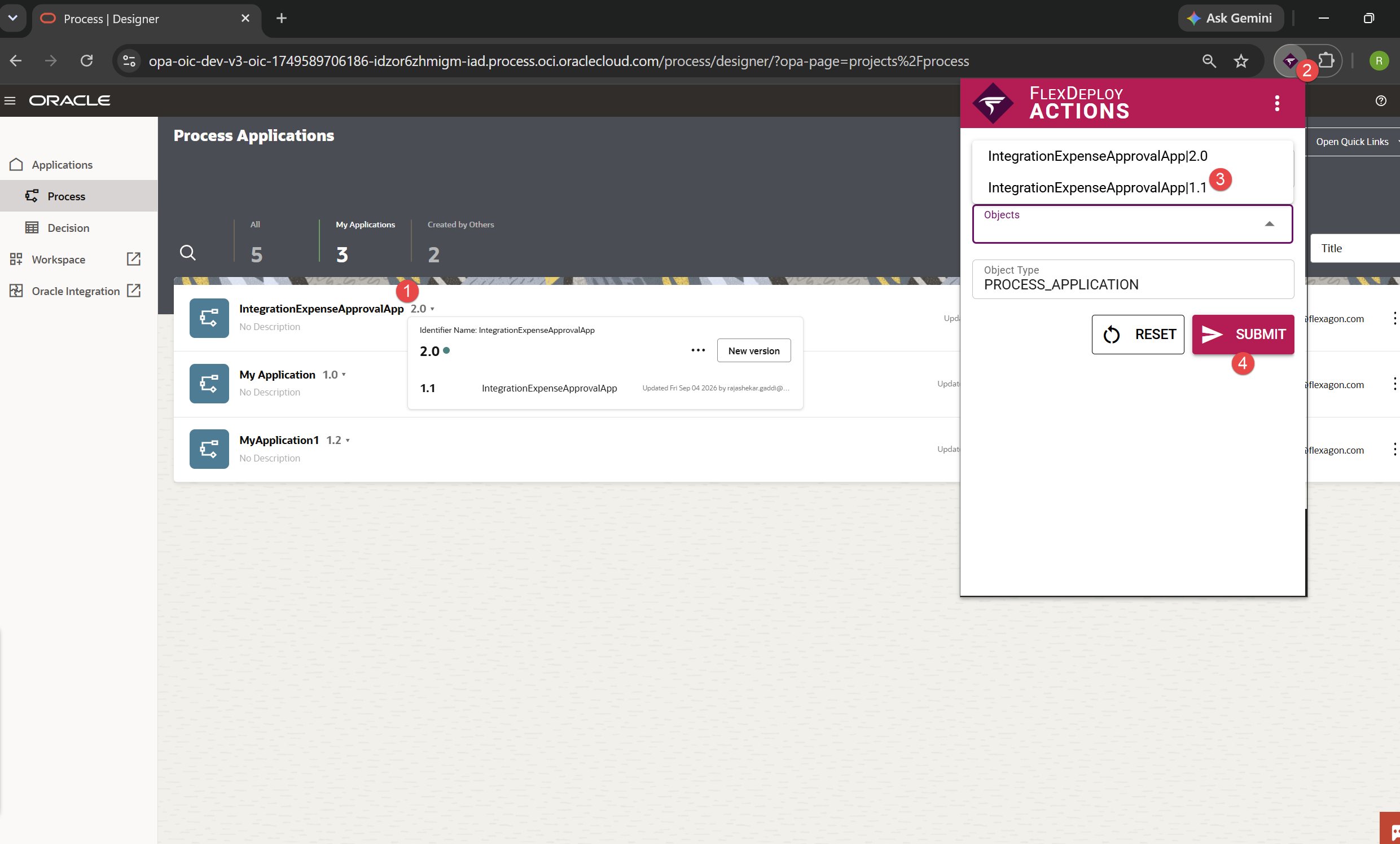
In Oracle Process Automation (OPA), users can select an application, whether it is aProcess Application or a Decision Application, and trigger the configured webhook to export it. The FlexDeploy Browser Extension makes this process faster by allowing users to select the application directly from the OPA UI and trigger the export.
- One difference with OPA is that the application list is not immediately available in the DOM when the landing page loads. Users need to open the small version/application dropdown to expose the available application information.
- This is important because the OPA UI initially displays the application title, but the title is not necessarily a unique identifier. The actual application identifier becomes available only after opening the dropdown.
- We intentionally do not populate the application list immediately when the extension loads because the required identifiers are not present in the initial DOM. Listing applications based only on the visible titles could result in duplicate or incorrect application selections.
- Know more about Browser Extension and OPA Example here