
Blog Posts
Target Properties
Property Name | Property Code | Required | Description |
|---|---|---|---|
Oracle Weblogic Home (WL_HOME) |
| Yes | WebLogic Home Directory. (e.g. /u01/oracle/products/fmw/wlserver) |
Weblogic Domain Name |
| Yes | WebLogic Domain Name. |
Weblogic Admin Listen Address |
| Yes | The listener address of the WLS admin server. (e.g. localhost) |
Weblogic Admin Listen Port |
| Yes | The port of the WLS admin server. (e.g. 7001) |
Weblogic Admin SSL Connection |
| No | Indicates whether the admin server is using SSL. |
Weblogic Admin User |
| Yes | The username for the WLS admin server. |
Weblogic Admin Password |
| Yes | The password for |
Weblogic Admin Domain Directory |
| No | Weblogic Domain Directory for AdminServer. If not provided, |
Weblogic Domain Directory |
| Yes | Weblogic Domain Directory.(e.g. |
Inputs
Input Name | Input Code | Required | Description |
|---|---|---|---|
File Path to Write Properties |
| No | Directory to store the Data Source properties files. If relative paths are given, paths inside of the FD_TEMP_DIR will be assumed. If it is left empty, the files will be created in the FD_TEMP_DIR. |
WebLogic Partition Name |
| No | Partition Name to retrieve the associated Data Sources. Provide input only if WebLogic Server version is 12.2x. |
WebLogic ResourceGroup Name |
| No | ResourceGroup Name to retrieve the associated Data Sources. Provide input only if WebLogic Server version is 12.2x. |
WebLogic ResourceGroup Template |
| No | ResourceGroup Template Name to retrieve the associated Data Sources. Provide input only if WebLogic Server version is 12.2x. |
Artifacts
This operation Produces properties-file artifacts.Endpoint Selection
This operation will select all available endpoints associated to the Target which have a resource type of WLS Admin Server. Since the admin server only runs on one server, it is expected that for a given domain, there will only be one endpoint with a resource type set to WLS Admin ServerEndpoint Execution
This operation will execute on the Admin Server endpoint selected using the WLS Admin Server resource type.Special Considerations
IfFile Path to Write Properties is not specified, the FD_TEMP_DIR folder will be used. If a relative path is specified, the path will be relative to the FD_TEMP_DIR directory.
Example Folder Structure
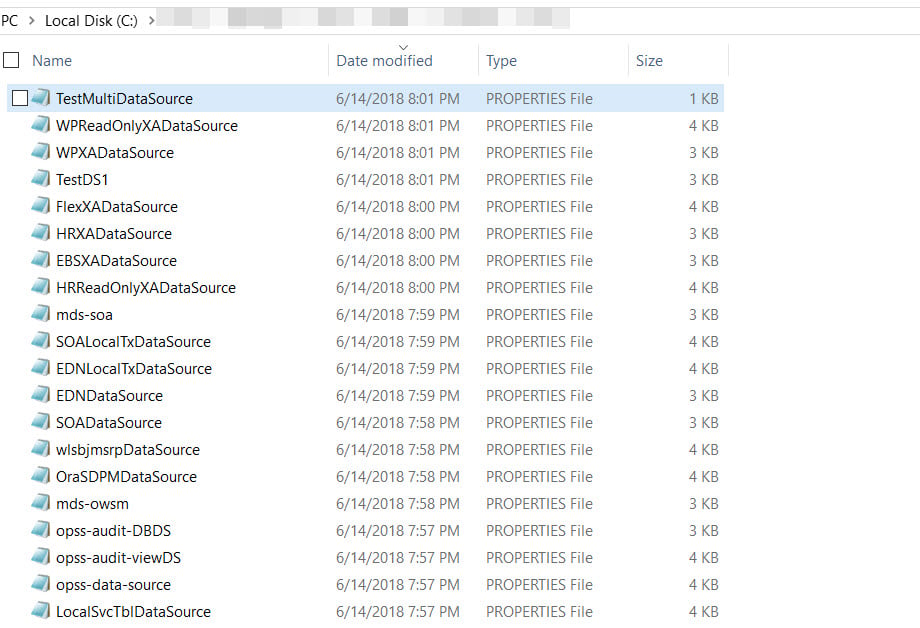
Properties File Naming
Properties files are named by the pattern <DSName>.properties, removing all spaces in the name. See Example Properties File below.SOADataSources.properties– This is the properties file. The path to write and store the file is referenced by theFile Path to Write Propertiesinput.