
Blog Posts
- https://flexagon.com/2017/03/automating-the-creation-of-weblogic-configurations/
- https://flexagon.com/2016/11/save-time-and-headache-automate-your-weblogic-data-source-configurations/
- https://flexagon.com/2018/04/yes-you-can-create-weblogic-bridges-reliably-with-flexdeploy/
- https://flexagon.com/2018/04/yes-you-can-create-work-managers-reliably-with-flexdeploy/
Target Properties
Property Name | Property Code | Required | Description |
|---|---|---|---|
Oracle WebLogic Home (WL_HOME) |
| Yes | WebLogic Home Directory. (e.g. |
WebLogic Domain Name |
| Yes | WebLogic Domain Name. |
WebLogic Admin Listen Address |
| Yes | The listener address of the WLS admin server. (e.g. localhost) |
WebLogic Admin Listen Port |
| Yes | The port of the WLS admin server. (e.g. 7001) |
WebLogic Admin SSL Connection |
| No | Indicates whether the admin server is using SSL. |
WebLogic Admin User |
| Yes | The user name for the WLS admin server. |
WebLogic Admin Password |
| Yes | The password for |
WebLogic Admin Domain Directory |
| No | Weblogic Domain Directory for AdminServer. If not provided, |
WebLogic Domain Directory |
| Yes | Weblogic Domain Directory.(e.g. |
WebLogic Adapter Plan |
| No | Path to the XML files used by Resource Adapters. (optional) If this parameter is not used, the adapters’ last-used setting will be used. |
Inputs
Input Name | Input Code | Required | Description |
|---|---|---|---|
Properties File Path |
| No | Comma-separated list of paths to the properties file(s). |
Outputs
Output Code | Required | Description |
|---|---|---|
| No | A |
Artifacts
This operation consumes properties file artifacts.Endpoint Selection
This operation will select all available endpoints associated to the Target which have a resource type of WLS Admin Server. Since the admin server only runs on one server, it is expected that for a given domain, there will only be one endpoint with a resource type set to WLS Admin Server.Endpoint Execution
This operation will execute on the Admin Server endpoint selected using the WLS Admin Server resource type.Special Considerations
IfProperties File Path is not specified, the FD_ARTIFACTS_DIR folder will be used. If a relative path is specified, the path will be relative to the FD_ARTIFACTS_DIR directory. This means that build workflow needs to capture the files to be processed appropriately.
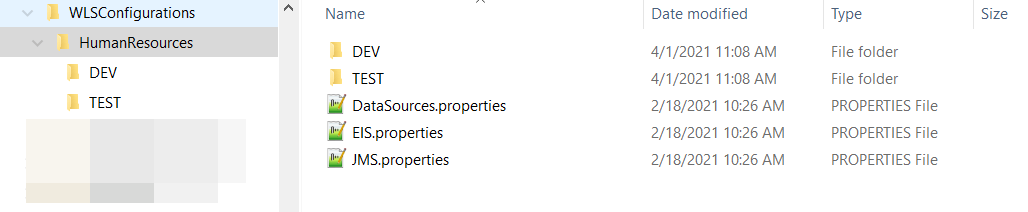
Properties files in environment code sub-folders will override settings in root folder files when the operation is run on servers in that environment. Environment folder names must match the environment code within the FlexDeploy topology. Environment override folders are optional and can be used only as necessary. You can put just subset of lines in environment code override files and only those will be different when deploying to that particular environment.
Example Folder Structure


Properties File Format
Multiple Property lists can be defined in each properties file. They can even hold JMS, DataSources and EIS entries in one file, but it is a best practice to use several files and name them according to their contents. If using multiple files, make sure that the lists contain unique values across files. Best practice would be to use the WebLogic DataSource Name as the list identifier for DataSources. Each properties file must start with one or more lists of elements present in the file. Any number of element types is acceptable in each file, and any number of each type of element is acceptable as well. The properties files will be processed for property replacement using$\{\{VARIABLE_NAME\}\} format. See Property Replacement Support for more information about property replacement.