
- Create SCM Instance for Git and define URL, User and Password information. You can also validate connection when creating SCM Instance for Git.
- At project level, select Git as SCM Type and provide details like Branch, Sparse Folders, Tag etc. which are defined as Groovy scripts.
Supported Versions
- 1.7.9+
Key Features
- Executes native commands using Git client
- Supports partial (sparse checkout) and shallow checkouts from Git Repository
- Integrates with on-prem or cloud Git repositories. Seamless integration with GitHub, GitLab, Azure DevOps, Oracle Developer Cloud Service, Bitbucket etc.
Integration Instance Properties
Property Name | Required | Description |
|---|---|---|
| Yes | The URL to the remote GIT repository. |
| Yes | The username to the remote GIT repository. |
| Yes | The password for |
| No | Private key used to connect to Git. Make sure that associated public key is configured on Git account. Git URL must start with |
| No | Timeout (milliseconds) for Git command execution. |
| No | Commit URL is automatically derived for GitHub, GitLab, Bitbucket, Azure DevOps, Oracle Developer Cloud etc. For other providers or on-prem installations, you should configure this property. Git Commit URL. Able to use the following variable {COMMIT} e.g. |
| No | File URL in Git repository is automatically derived for GitHub, GitLab, Bitbucket, Azure DevOps, Oracle Developer Cloud etc. For other providers or on-prem installations, you should configure this property. Git Repository File URL. Able to use the following variables {BRANCH} {FILEPATH} {SPARSE_CHECKOUT_FOLDERS} e.g. |
| No | Commit URL for File is automatically derived for GitHub, GitLab, Bitbucket, Azure DevOps, Oracle Developer Cloud etc. For other providers or on-prem installations, you should configure this property. Git Repository File URL for Commit. Able to use the following variables {BRANCH} {FILEPATH} {SPARSE_CHECKOUT_FOLDERS} {COMMIT} e.g. |
FDGIT_FILE_CONTENT_URL and FDGIT_FILE_CONTENT_COMMIT_URL. If only one of this property value is set, then Repository URL will be shown as File content link.
Target Properties
Property Name | Required | Description |
|---|---|---|
| No | The GIT executable folder. |
Plugin Operations
Git Installation Steps
Git 1.7.9 or higher is needed for FlexDeploy. If yum installs a lower version by default, then you need to get the Git source code and build it for install. Here is reference - https://tecadmin.net/install-git-2-0-on-centos-rhel-fedora/. Run these steps as root. You can download a newer version than 2.7.1 as well.- yes | yum install curl-devel expat-devel gettext-devel openssl-devel zlib-devel
- yes | yum install gcc perl-ExtUtils-MakeMaker
- cd $HOME
- wget https://github.com/git/git/archive/v2.7.1.tar.gz
- tar -xvzf v2.7.1.tar.gz
- cd git-2.7.1/
- make prefix=/usr/local all
- make prefix=/usr/local install
Token Authentication for GitHub
Personal access tokens (PATs) are an alternative to using passwords for authentication to GitHub when using the GitHub API or the command line. To create a Personal access token, follow https://docs.github.com/en/github/authenticating-to-github/keeping-your-account-and-data-secure/creating-a-personal-access-token While generating Key Scope items is completely based on your requirement. Basic permission to grant this token is required, Repo- Full control of private repositories Admin:repo_hook- read:repo_hook read repository hooks for a clone, if you are doing commit from FlexDeploy then you need write:repo_hook Once token is generated, Update GIT password property with the token value on specific GIT Instance under Topology - Integrations - Source Control.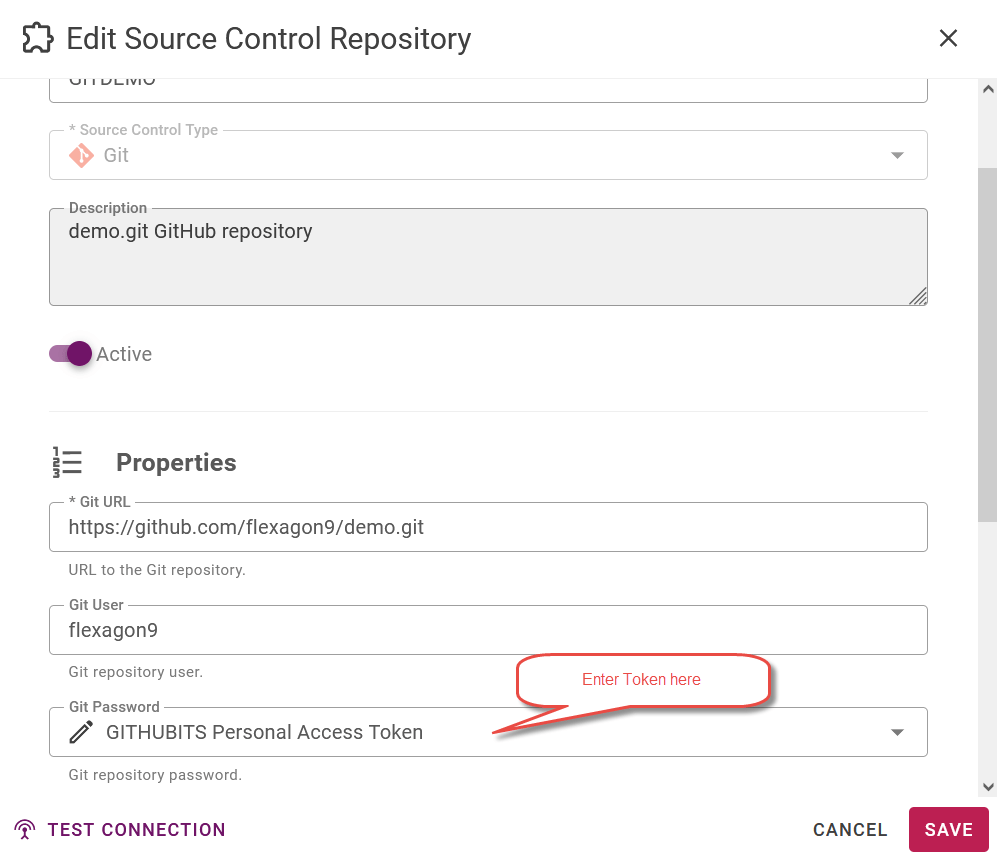
Multiple SSH Keys for different repositories
If you have more than one source control account with the same domain name (i.e. github.com, bitbucket.org, etc) and wish to use a different SSH key for each account follow the below instructions:- Generate your SSH keys if you have don’t have them already. SSH key must be RSA algorithm (ssh-keygen -t rsa). It’s recommended to store the SSH keys in the .ssh folder.
-
Ensure <FlexDeploy_User_Home/.ssh folder exists. The .ssh folder should already be there in the home directory since ~/.ssh directory is automatically created when the user runs the ssh command for the first time. If the directory doesn’t exist on your system, create it using the command below:
-
Create the configuration file name “config” in the <FlexDeploy_User_Home>/.ssh/ directory of the user running FlexDeploy, if it doesn’t already exist.
-
The SSH config file takes the following structure:
-
Add the appropriate entries for your organization and use case. In this example, we’ll add one entry with Host “bitbucket-alt”
-
The SSH config file takes the following structure:
- On the account instance, set Host value in the URL.