
Target Properties
Property Name | Property Code | Required | Description |
|---|---|---|---|
OIC Account |
| No | The OIC account includes essential properties such as the URL, Username, Password, and OAuth details for the OIC instance. Cloud account credentials are required for downloading or uploading catalog items. You can manage the OIC account via the Integrations > Cloud page. See Configuring OIC Cloud Account for additional details. |
Project Properties
Property Name | Property Code | Required | Description |
|---|---|---|---|
Project File Includes |
|
| Controls files included in Project Files. Enter expressions separated by ##. Leave empty to select all files. Begin or end the expression with * for simple wildcards. Otherwise, regex |
Project File Excludes |
|
| Controls files excluded from Project Files. Enter expressions separated by ##. Leave empty to select all files. Begin or end the expression with * for simple wildcards. Otherwise, |
Inputs
Input Name | Input Code | Required | Description |
|---|---|---|---|
OIC Account |
| No | The OIC account with all the required properties like Base URI, Username and Password for running OIC Instance. |
Artifacts
This operation produces artifacts that will be stored in the artifacts repository.Endpoint Selection
This operation will select all available endpoints associated to the Target.Endpoint Execution
This operation will execute on any one of the selected endpoints and will be random in the determination of which one.Recommended Folder Structure
This folder structure is considered to be best practice. Expanded and compressed iar files are shown. Choose one and be consistent.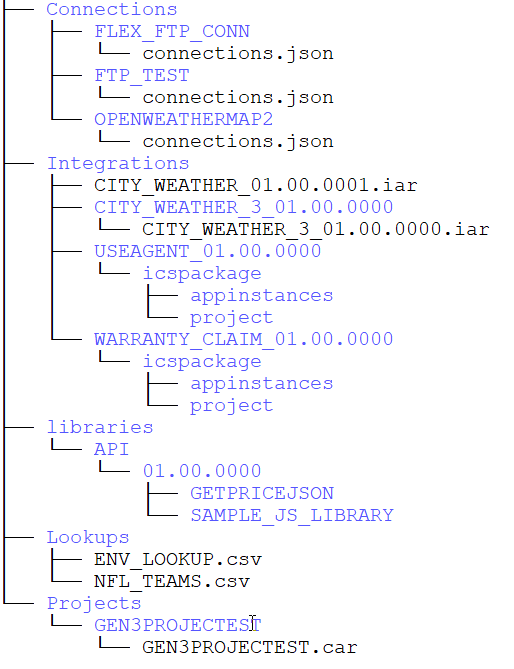
- Connections - Connections that are exported using exportConnection operation follows this folder structure. The folder name must be the connection id which contains the connections.json file.
- Integrations - Each integration (compressed as an IAR or uncompressed) is stored in its own folder in SCM. This matches the format of the exportIntegrations operation outputs, so you can use that operation to setup your source control if you don’t already have one or wish to migrate to the recommended structure.
- Lookups - The .csv files that are exported using exportLookup operation. The file name will be the lookup name with a .csv extension.
- Libraries - Any .jar files found in the repository. Filepaths must match the build artifact path of a full library build or the filepath during Populate From Backend.
- Projects - Each project .car file archive is stored in its own folder in SCM. This matches the format of the exportIntegrations operation outputs, so you can use that operation to setup your source control if you don’t already have one or wish to migrate to the recommended structure. Oracle does not allow modification of the contents, so extracting and recompressing is not recommended, although it decreases visibility in SCM. You can manually add steps to decompress and compress the .car files if you wish to improve the ability to diff the files.